ICAP
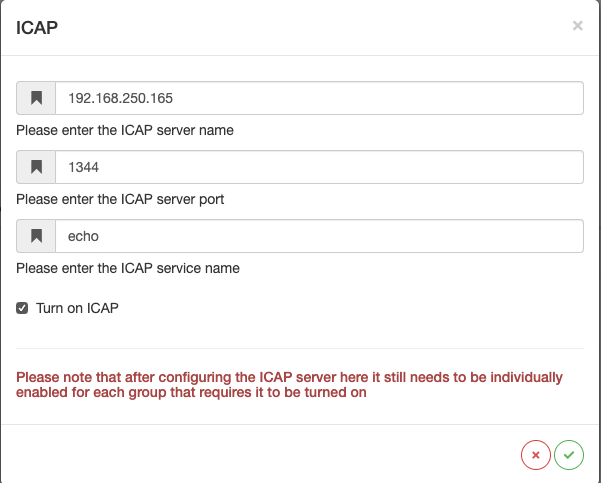
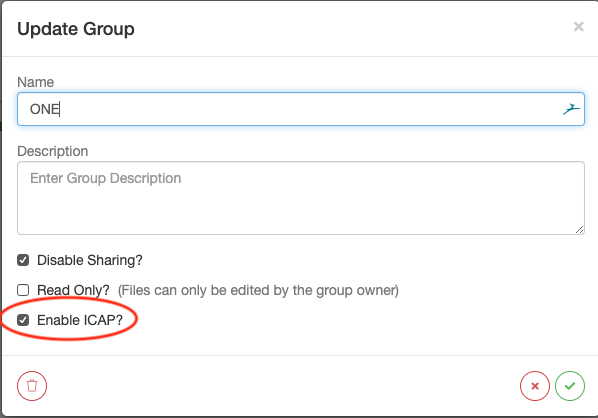
To configure ICAP in SureDrop is a 2-step process.
Configure the ICAP server details in the Admin ICAP Dialog
Turn on ICAP for the relevant groups
Installing an Open Source ICAP Server
Install linux
Install any version of linux, Ubuntu was used for this test
Download and Build the c-icap Main Binary Source
Download http://sourceforge.net/projects/c-icap/files/c-icap/0.5.x/c_icap-0.5.5.tar.gz/download from http://c-icap.sourceforge.net/download.html
cd ~\Downloads
gunzip c_icap-0.5.5.tar.gz
tar -xvf c_icap-0.5.5.tar
cd c_icap-0.5.5/
./configure --prefix=/usr/local/c-icap
make
sudo make install
Download and Build the c-icap Modules Source
Download http://sourceforge.net/projects/c-icap/files/c-icap-modules/0.5.x/c_icap_modules-0.5.3.tar.gz/download from http://c-icap.sourceforge.net/download.html
gunzip c_icap_modules-0.5.3.tar.gz
tar -xvf c_icap_modules-0.5.3.tar
cd c_icap_modules-0.5.3
./configure --with-c-icap=/usr/local/c-icap --prefix=/usr/local/c-icap
make
sudo make install
Using the echo Service
c-icap comes with an echo service which can be used as a template for developing your own c-icap plugin modules.
The service is called echo, to use it just set the service name in
SureDrop to echo
The developer instructions for making changes to this small c shared lib can be found here:
https://sourceforge.net/p/c-icap/wiki/Developers
In the svr_echo.c file the echo_check_preview_handler method is
the method that is used to check the first 1024 bytes of data. To, for
example, implement a magic number file check it would be possible to
implement this check here and return a 204 if successful or a 4XX for a
fail.
To Run the c-icap Service
debug
$> sudo /usr/local/c-icap/bin/c-icap -N -D -d 10
normal
$> sudo /usr/local/c-icap/bin/c-icap