Version 2.10.x
Version Information
This is a minor version upgrade which was published as a dot-zero only because it involves a database schema change. All version information and release deliverables are same as the previous Version 2.9.x.
Feature requests / enhancements implemented
File upload speed
We have improved the file upload speed by a factor of two! This was done by re-engineering the way uploads were processed in the backend.
Upload chunk size
We have also re-optimised the file upload chunk size based on our performance tests.
File size |
Chunk size |
|---|---|
Greater than 10 MB but less than or equal to 1 GB |
10 MB |
Greater than 1 GB but less than or equal to 10 GB |
100 MB |
Greater than 10 GB |
500 MB |
Minor Releases
Version 2.10.1 - 27th Feb 2020
Explicit file version: We’ve made the file version information a first class citizen of the folder and file data table. This was a better UX design.
Version 2.10.2 - 4th Mar 2020
Separate Azure AD and LDAP configuration: We separated the Azure AD Integration and LDAP integration in the Admin page and made them mutually exclusive. We also added a third identity provider configuration page for SafeNet Trusted Access.
Version 2.10.3 - 4th Mar 2020
Standardised UI for Identity Providers: In the admin page we brought the identity provider settings together in the GUI making it more intuitive and meaningful for the user.
Version 2.10.4 - 5th Mar 2020
Maintenance release (For non-production use only)
Version 2.10.5 - 5th Mar 2020
File refresh issue: This was a minor timing issue in refreshing the GUI. Uploaded files were not appearing in the documents grid without a manual refresh. This issue was introduced by the changes done for making the file uploads faster.
Version 2.10.6 - 12th Mar 2020
Identity Provider Settings: The IDP settings in the Admin page has been redesigned and brought under a common parent. Thales’ STA has been added to the GUI, and the backend supports a hand-shake only. The next release will fully integrate STA with SureDrop.
Feature toggles: Feature Toggles (often also referred to as Feature Flags) are a powerful technique, allowing teams to modify system behaviour without changing code. It facilitates continuous delivery and other important Agile software development practices. Read this page if you’re feeling pedantic.
Multi-lingual SureDrop: This enhancement laid the foundation of extending SureDrop’s UI to support localisation (multiple languages). The feature is presently hidden behind a toggle for production instances.
Version 2.10.7 - 24th Mar 2020
Enhancements implemented
STA Integration: SureDrop now supports Thales’ SafeNet Trusted Advisor as an identity provider. Please refer to our Safenet Trusted Access Integration document to configure and enable this.
Manually import users in bulk: Users can now be manually imported to SureDrop via a delimited comma-separated text (CSV) file. Manually importing user records enables you to add numerous users in a single operation. Please refer to our documentation to understand the necessity for implementing this feature.
Importing users from Azure AD: We discovered that SureDrop could only import 100 users from Azure AD. This issue was due to the way SureDrop was interacting with Azure AD. It didn’t support pagination.
Folder sharing: This was yet another example of how imperative user feedback is for our progress. One of our users reported that
clicking share from ellipsis menu ( "..." in Actions column) failed when doing it on a folderand we resolved it as quickly as we possibly could.
Version 2.10.8 - 24th Mar 2020
Login using Azure AD: We discovered a pesky issue during logging in using Azure AD in our internal testing and resolved it.
Version 2.10.9 - 9th April 2020
A maintenance release (For non-production use only)
Version 2.10.10 - 9th April 2020
Another maintenance release (For non-production use only)
Version 2.10.11 - 10th April 2020
Reset Password: We now have the much sought after
Forgot Passwordfunctionality in SureDrop. The way it works is based on your username SureDrop now sends a secure password reset token via email to local SureDrop users. This token can be used only once, expires in 24 hours if unused, and also expires in 30 minutes if you click on it and don’t reset the password. SureDrop administrators with single-sign-on accounts have to now setup their SupportDetails for this reset password functionality.Bookmark prompt: SureDrop has added a
Please remember to bookmark this pageprompt to the login page. Users can choose not to display this message and this choice is remembered in the backend. Once hidden there is no way to get this prompt back again, so please ensure you’ve bookmarked your SureDrop URL.Use OIDC for Azure AD: This is a technical feature and has no impact (or even noticeable enhancement) for end users. For many months now Microsoft has been ``strongly recommending`` to migrate applications from Azure AD Graph API to Microsoft Graph API. If you’re feeling pedantic, please checkout this blog for a more detailed explanation on why this migration is essential. OpenID Connect (OIDC) is an authentication protocol built on OAuth 2.0 that you can use to securely sign in a user to a web application. The protocol specs are given here and the sequence diagram for the sign-in is shown below:
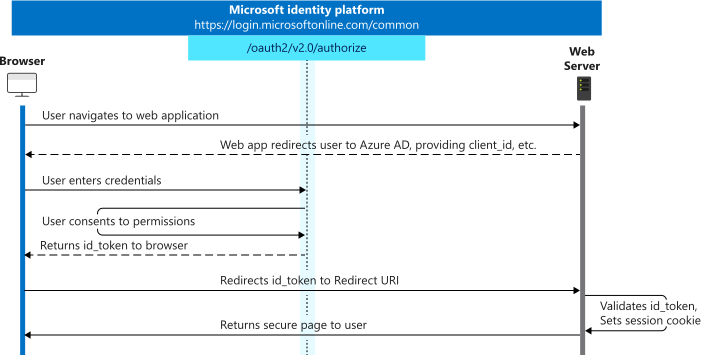
Large file uploads: We have now implemented an intelligent ratcheting throttling system for large file uploads. Files now appear as
processingas soon as they’re uploaded until all the backend jobs like compressing and encrypting are completed. This solves many errors we found with uploading large files.Download notification: When a user clicked on a link from a download notification email, it took them to the wrong folder. This was solved by URL encoding the file location.
Sharing passwords: Complex sharing passwords with special characters were not being accepted in the sharing page once the users uploaded files to it, or the page timed out. This happened due to incorrectly sanitising JSON snippet (including the password) in the backend.
Searching files in deactivated groups: Standard and restricted users were able to search and get to files within deactivated groups. We’ve closed this security issue by displaying documents from deactivated groups only when the Show Deactivated Groups option is checked. Standard and restricted users don’t have the necessary permissions to show deactivated groups and therefore cannot get to the files in them.
CSS caching: We got rid of some pesky aggressive browser caching issues across version upgrades.
File sharing: There was a synchronisation hole in file sharing across browser sessions. Once sharing is disabled by the admin, users with valid session tokens could still share files using their browser. After this bugfix the users with valid session tokens will get an error notification informing them about the change in the system state.
Undelete documents: are no longer allowed on deactivated groups.
Renaming files: didn’t work as expected and defaulted to previously renamed file. Sometimes a rename was stuck in the processing state and couldn’t be recovered until the file was re-uploaded.
Update username: External users had to be deleted and resynchronised to SureDrop if an administrator changed their username in the IDP system. This was because username is a unique entity in SureDrop and cannot be modified. The background IDP sync agent has been modified to accommodate this external change and usernames are now synchronised every couple of minutes.
Azure AD users: SureDrop could only import 100 users from Azure AD. This is the default page size for Azure AD Graph API responses from Microsoft. As part of implementing OIDC for Azure AD we fixed this defect by correctly implementing paging using Microsoft Graph APIs.
Notify All: also notified the currently logged in user if he/she was a member of the currently selected security group. This unwanted email has now been skipped and all members of the group except the current user are notified.
Version 2.10.12 - 14th April 2020
Large File Upload enhancement: Large files now show a progress bar showing the status of the background processing applied to each upload.
Large File Upload defect: Resolved an issue where each upload chunk displayed as a new version of the file.
Version 2.10.13 - 16th April 2020
Synchronise STA Users: SureDrop sync agent was considering some mandatory user attributes for STA and didn’t have aggressive logging. We have changed this to make the user download more fault tolerant (defensive) and verbose (logging)
Cancel file upload: Users can now cancel individual (or all) file uploads. SureDrop deletes all cancelled files in the background.
Browser performance: We noticed that multiple large file uploads were consuming too much memory in the browser and making it slower. We have reduced this memory consumption impact significantly.
Version 2.10.14 - 17th April 2020
Office 365: Due to the upload performance changes done in previous point releases, some of the Office 365 functionalities such as creating new files were not working.
Manual username: Administrators were unable to enter manual usernames during adding new users. This has been fixed in the GUI.
Version 2.10.15 - 18th April 2020
STA Auto login: Added support for STA users to login automatically to SureDrop by appending
username=<sta-user-name>&login=autoto the service login URL of the STA OIDC application. So, the complete URL should now look something similar to this -https://<your-suredrop-home-url>/#viewLogin?company=<your-suredrop-company-name>&username=<you-sta-username>&login=auto
Version 2.10.16 - 30th April 2020
Internationalisation: SureDrop is now available in thirteen new languages using UTF-8 for international characters. The languages supported are Arabic, Chinese (simplified and traditional), French, German, Indonesian, Hebrew, Japanese, Korean, Malay, Polish, Spanish and Thai. This localisation feature has been enabled for our SaaS environments and needs a minor DB configuration for on-prem customers. Please reach out to your SureDrop administrator if you have SureDrop installed on your own premises and would like to enable this functionality.
Version during multi-select: When multiple files are selected SureDrop disables the
Vbutton to restrict users from trying to get to the version information.Compressing files and folders: Due to the asynchronous nature of file uploads SureDrop was sending out emails about zip files too soon, when the file wasn’t ready yet.
Progress bars: For large file uploads the progress bars in the file table and the upload queue were not in sync.
Session token: SureDrop session token wasn’t counting down / timing out during bulk file uploads.
Remember me: There were some minor problems with the way SureDrop handles cookies when the
Remember Meoption was not selected.
Version 2.10.17 - 16th June 2020
Expand STA: Thales had requested for expanding STA to Safenet Trusted Access. This has now been updated in GUI.
Rename context menu: We were told that the right-click context menu
Download as zipwas a misnomer and should be renamed to its actual functionalityZip selected files. This has now been updated in GUI.
Version 2.10.18 - 1st July 2020
My Documents group: All SureDrop users regardless of their role in the system, now have a
My Documentssecurity group. This is a new group designed to store the user’s personal documents. Some important features of this group are -It is system generated and cannot be altered or deleted by any user.
No user regardless of their role in the system, can get access to the contents in another user’s
My Documentsgroup, this includes administrators and forensic users.All zip files are automatically directed to this group.
Copying between groups: Users can now copy or move documents across groups. This feature was add-on for My Documents since most users wanted to copy documents from their
My Documentsto other groups.Deleting unavailable files: When a file failed to upload due to any system error, it was impossible to delete it from SureDrop. This has now been fixed.
Folder names with period character: Users could import folders to SureDrop with a . in the folder name, but couldn’t create such a folder in SureDrop using the GUI; though the backend API supported creation of such folders. This has been fixed in the GUI and users can now create folders with
.character in the folder name.Adhoc sharing optional password: It was brought to our notice that the optional password field in the adhoc sharing window in the GUI was displayed in plain text. We have changed this to match other password fields in the GUI so that it is redacted by default but users have the ability to show the password if they want to.
On-premises Installations: had a couple of issues around named external databases and initialising a company name with - character(s) in it. These issues have been fixed and tested for on-prem installs.
Version 2.10.18 SP1 - 8th July 2020
STA login: There was a bug reported to us in logging into SureDrop using STA. Users were sometimes locked out with an unauthorised error message especially when they were geographically far from the application servers. We had to hotfix this issue on 2.10.18 since this was the last minor release for 2.10.
Version 2.10.18 SP2 - 13th July 2020
Enabled TLS v1.2: We enabled TLS v1.2 in SureDrop so that it can connect to KeySecure correctly.
Notification links: were not working properly as the users were directed to an empty page without folders. This has been fixed and the users are now first directed to the login page, and then taken to the notification path on successful authentication.